FMCSA Data for Trucking Insurance Producers

Find trucking accounts worth working.

Build your list by state, fleet size, insurer, and estimated renewal timing. Open the carrier report to connect authority, insurance history, and safety evidence before the first conversation.

Free to start, no card. Paid plans cancel anytime from Account > Billing.

View example report

Example PDF · fictional carrier data

Look up one carrier

Enter a USDOT, then create a free account or sign in to view that carrier's report.

Free account required · 100 distinct carrier records total · No monthly reset · No card required

  • 1.7M motor carriers
  • 350K+ active for-hire
  • Every USDOT resolves
  • Source dates shown in carrier reports
  • Source: FMCSA public records. Census, authority, and current insurance status refresh daily; insurance filing history and safety signals refresh monthly.
Photo: Tom Jackson / Pexels

See DOT Intel at work

Build the list. Read the report. Prepare the conversation.

DOT Intel connects the carrier, its insurance history, and the market around it. Bring the record and your questions into the next call. These are real product screens from a demo account using public-record data.

Find the accounts

Build the trucking list you actually want to work.

Narrow the FMCSA carrier universe by state, fleet size, authority, insurance status, and estimated renewal timing. See the matching carriers before you decide what belongs in a list.

Build a quality list for your book, use the estimated window to guide your x-date question, then confirm the actual date with the insured.
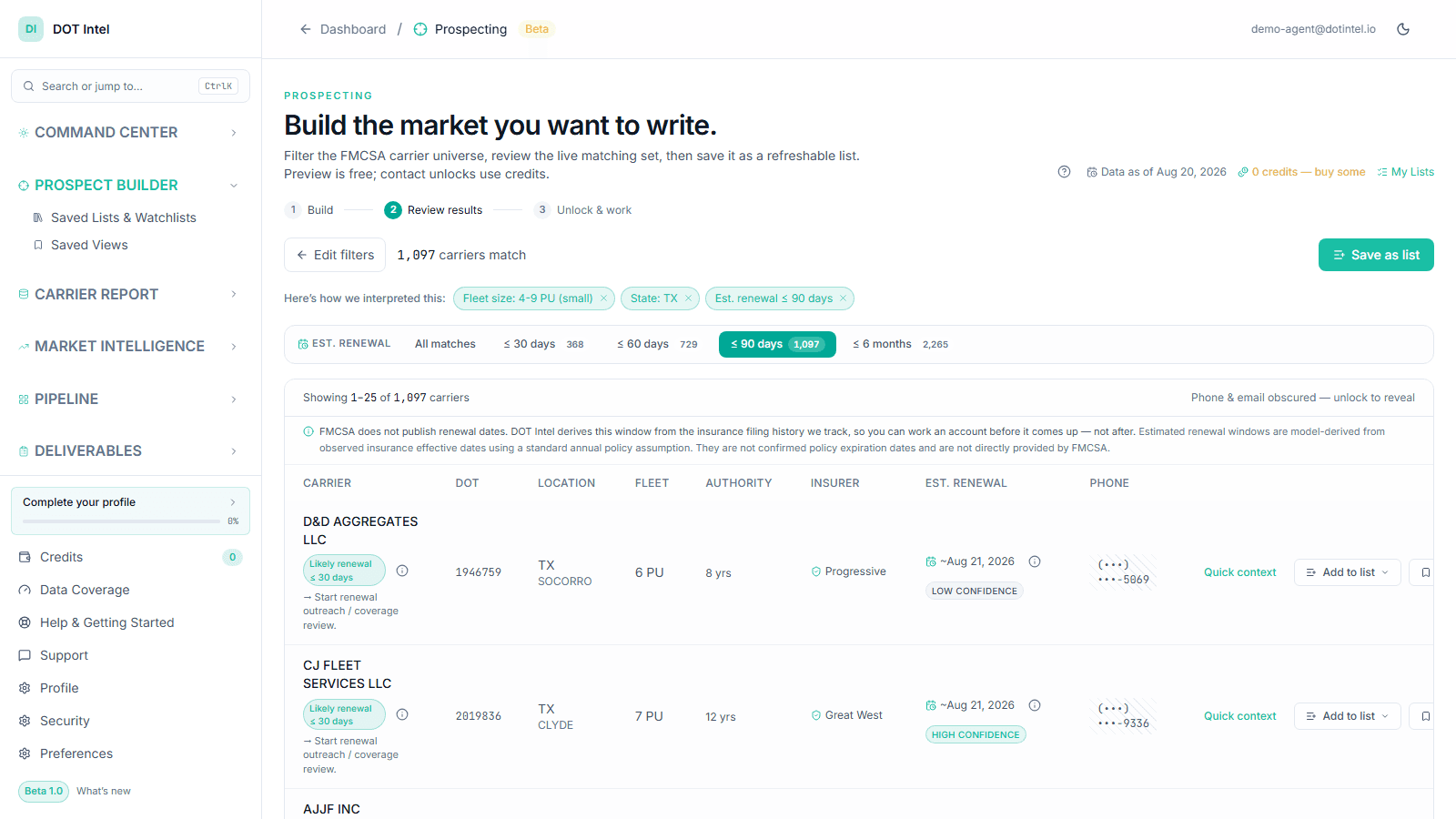
Actual DOT Intel screenDemo account · public-record data
Actual DOT Intel Prospect Builder results showing trucking-account filters, carrier matches, fleet size, insurer, and estimated renewal timing.

Read the account

Start with the DOT number. See the insurance story around it.

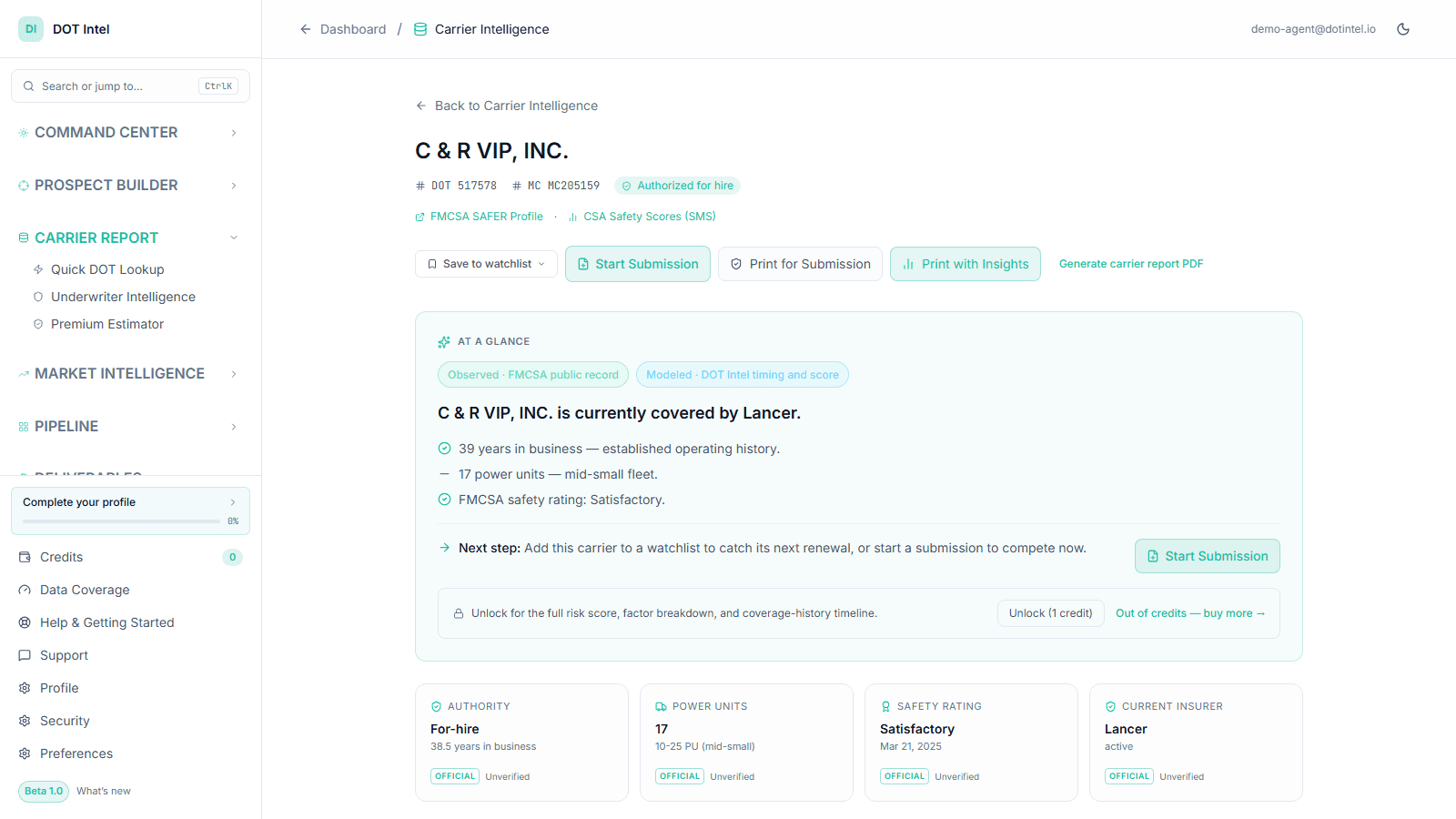
Bring authority, fleet, current insurer, public insurance history, safety signals, and the next practical action into one carrier view. Observed FMCSA records stay clearly separated from DOT Intel estimates.

Use the report to prepare the questions—not to promise that a market will quote or bind the account.

View example report

Example PDF · fictional carrier data

Actual DOT Intel screenDemo account · public-record data
Actual DOT Intel Carrier Report screen showing a motor carrier's authority, fleet, insurer, safety rating, and next-step actions.

Read the market

See which insurance companies are moving in each state.

Compare insurer activity nationally or by state, follow filing-share and insurer-movement signals over time, and see where observed filing activity is growing or pulling back.

It gives you a better market conversation and a better underwriter conversation. It does not make the placement decision for you.

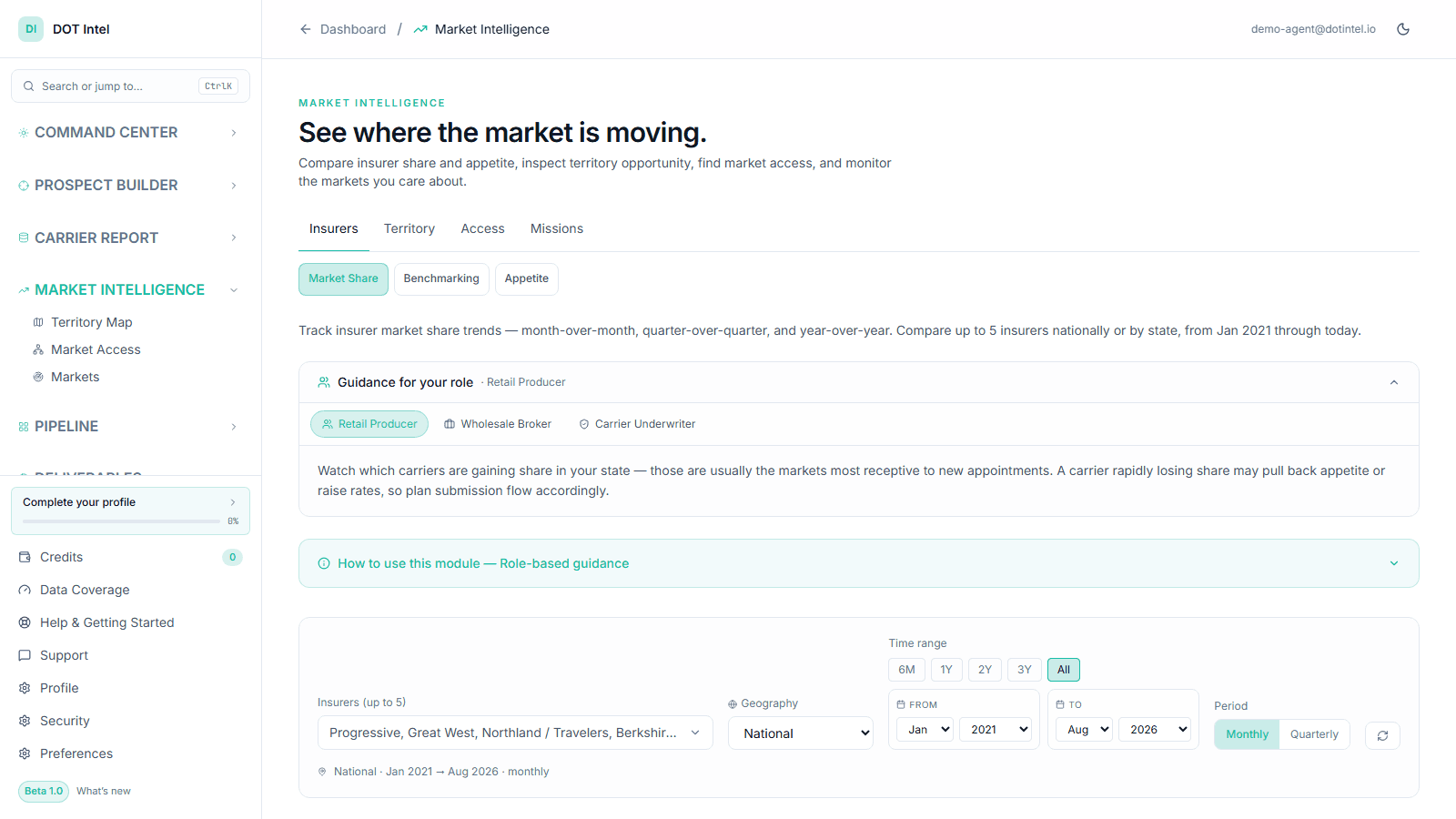
Actual DOT Intel screenDemo account · public-record data
Actual DOT Intel Market Intelligence screen for comparing trucking-insurance company activity and trends by geography and time period.

FMCSA records are public. DOT Intel saves the tab-switching by cleaning, joining, and organizing the records around the way trucking insurance work actually gets done.

Build my first 100-account list

The carrier report

Bring the account story into one document.

Authority, fleet, current insurance filings, coverage history, and safety evidence belong in the same conversation. The Carrier Report puts them together with source limitations and practical takeaways.

  • Prepare the call: identify facts to verify and questions to ask.
  • Support the submission: carry the public-record context into the underwriting conversation.
  • Keep the limits visible: a filing is not proof of coverage, and a signal is not a placement decision.

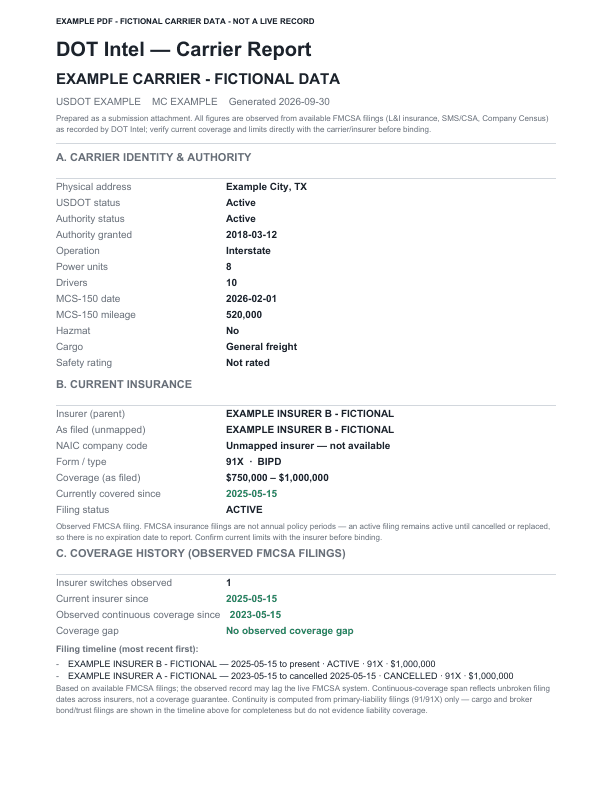
Example PDF · fictional carrier data. Shows the report format, not a real carrier's record.

Example PDF · fictional carrier data

Fictional carrier-report PDF example showing the actual report layout.
Free with signup

Start with a USDOT. Find the insurance opportunity.

Every USDOT resolves — all 1.7M FMCSA-registered carriers, not a sample. Look up a motor carrier and see the signals your team needs before prospecting, quoting, underwriting, or routing the opportunity.

Free account required. Continue to this carrier after signup or sign-in.

Free account required. Already signed up? Log in.

What you get on signup

Fleet + authority snapshot

Fleet size, authority status, and current insurer in one view — no tab-switching across FMCSA tools.

Filing history + estimated renewal window

Insurance filings, prior insurer, and coverage effective dates — see which carriers are approaching their renewal window before competitors do.

Safety depth from the public record

CSA BASIC percentiles, a 24-month safety panel, crash history, and coverage continuity — every factor traced to a public FMCSA record, with thin data disclosed rather than scored around. FMCSA's BASIC measures remain the authoritative public safety signal.

FMCSA data versus insurance intelligence

The data is free. The work is not.

FMCSA is the authoritative public source. DOT Intel is the working layer that connects those records, explains what changed, and makes the next insurance decision easier.

Do-it-yourself

Start with public records

You can look up a carrier and download FMCSA data at no charge. Turning it into a repeatable insurance workflow still takes time, data skills, and maintenance.

  • Search separate carrier, safety, authority, and insurance systems
  • Download files and learn each dataset's definitions
  • Join records, normalize insurer names, and resolve history
  • Repeat the process to find what changed

DOT Intel

Open with the analysis ready

Search one connected carrier record, compare like accounts, monitor changes, and move the result into a list, report, watchlist, or pipeline without rebuilding the research.

  • Carrier, authority, insurance, fleet, and safety context in one read
  • Writing-company normalization and insurer-parent rollups
  • Estimated renewal timing and observed coverage-change signals
  • Saved searches, monitoring, reports, and producer workflow

Put the insight to work

Three decisions, without the data-engineering project.

Compare DOT Intel and FMCSA

Assess account risk

Know what deserves attention before the quote.

Read authority, fleet, insurance continuity, safety activity, crashes, inspections, and violations together. Observed records stay separate from DOT Intel's directional indicators, with source and freshness context attached.

Example workflow: flag a 12-power-unit account with two insurer changes and a recent fleet increase for a deeper conversation before placement.

Prepare account placement

Walk into the market with a clearer account story.

See the filing insurer, filed limits, prior insurance history, fleet profile, cargo, operating radius, and observed market alignment before deciding where the account may deserve a look.

Example workflow: explain why a seasoned 4-24 power-unit fleet resembles accounts an insurer has recently carried-without calling that observation confirmed appetite.

Read market dynamics

See movement by state, insurer, and fleet size.

Compare carrier-of-record filing counts and momentum across states, insurer families, cargo segments, and 1–3, 4–24, or 25+ power-unit fleets. Find where books appear to be expanding, stable, or contracting.

Example workflow: identify which insurer families are gaining mid-fleet trucking accounts in Texas before planning producer outreach or a territory conversation.

Why DOT Intel exists

Less time hunting for records. More time understanding the account.

DOT Intel was built because producers were still jumping between FMCSA pages, insurance filings, spreadsheets, and market conversations just to understand one trucking account.

DOT Intel puts that work in one place. It helps you find the account, understand what changed, review the insurance and safety record, and have a better conversation with the underwriter.

The founding intent is simple: make useful carrier intelligence accessible to agents building a book, including those working with a small budget. Start with the evidence you need to prepare for the next conversation, and build from there.

It won't tell you who will write the account. It will help you know who to think about and what questions to ask.

Ronnie O'Dell

Built by Ronnie O'Dell, three decades in commercial insurance.

Read the founder storyronnieodell.com

Simple pricing

Start with 100 carrier records. Pay for the monthly volume you need.

Every paid plan includes the same DOT Intel tools. Only users and monthly lookups change. Every lookup can be downloaded.

Free

$0

1 user · 100 carrier lookups, lifetime. No monthly reset. No card required.

Build my first 100-account list

Producer

$25/month

3 users · 100 carrier lookups a month, each one downloadable.

See Producer

Producer Plus

$49/month

5 users · 300 carrier lookups a month, each one downloadable.

See Producer Plus

Agency Team

$100/month

10 users · 1,000 carrier lookups a month, each one downloadable.

See Agency Team

Paid access lasts only while the subscription is current. Monthly allowances are enforced by DOT Intel.

View full pricing

For motor carriers · one complimentary report

See what your USDOT record may say in an insurance conversation.

Confirm your company, verify your email, and download a professional DOT Safety & Insurance Readiness Report. If the FMCSA email is missing or different, a one-time mobile code keeps the path open for the real carrier.

Plain-English signals and next stepsOne report per verified account, phone, and USDOT
Get My Free DOT Report

Start now

Make your next carrier conversation count.

Find a trucking account, read its insurance and safety story, and decide what to ask next. Keep your research and follow-up in one place.

Example PDF · fictional carrier data

100 distinct carrier records in your Free account, with no monthly reset. No card required.